


AMS360 Report Instructions

Book of Business Report:
-
In AMS360, go to My Agency Reports > Under Report Templates, scroll down to “Book of Business,” click to open.
-
Enter the in-force date as last date of the prior month > click thru each: Business Unit, Company, Personnel and Lines of Business and just double check that they default to ALL. No other modifications are needed.
-
Click Run Report, this will generate to the left of your screen under “My Reports,” open by clicking the XLS link.
-
File > Save as "Agency Name - Book of Business MMYY” to a folder on your system. The report is now ready to email.
Production Analysis Report:
-
In AMS360, go to My Agency Reports > Under Report Templates, scroll down to “Production Analysis,” click to open.
-
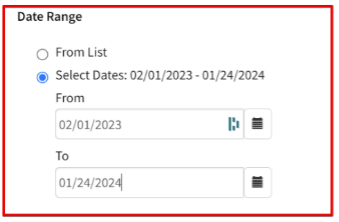
In Date Range check “Select Dates.” In “From/To” enter dates for 12 month move with the to date being the last month > click thru each: Business Unit, Company, Personnel and Lines of Business double check that they default to ALL. No other modifications needed.
-
Click Run Report, this will generate to the left of your screen under “My Reports,” open by clicking the XLS link.
-
File > Save as "Agency Name - Production Analysis MMYY” to a folder on your system. The report is now ready to email.
Customer Analysis Report:
-
In AMS360, go to My Agency Reports > Under Report Templates, scroll down to “Customer Analysis,” click to open.
-
No modifications need to be made to this report – make sure to set the date range with a start date of 01/01/1900, click run report, this will generate to the left of your screen under “My Reports.” (Double check Business Unit and Personnel is set to all)
-
Open the report by clicking the name.
-
Click “Actions” in the upper right corner, and in the drop down select “export report.”
-
In the pop-up window, export options:
a. Excel – Editable report
b. Columns – all columns
c. Filters – Full data set
d. Then export
-
The file will download, open > File > Save as "Agency Name - Customer Analysis MMYY” to a folder on your system. The report is now ready to email.
Your reports are now ready to submit.
Email all reports to [email protected]

