


Nexsure Report Instructions

*If you do not see the below reports in your profile, please contact Nexsure support to get these added.
Preliminary Setup: Configuring Client Enterprise Codes
Before running reports, ensure that all Client Enterprise Codes are properly configured in Nexsure.
This is a one-time setup:
-
Navigate to Organization > Setup
-
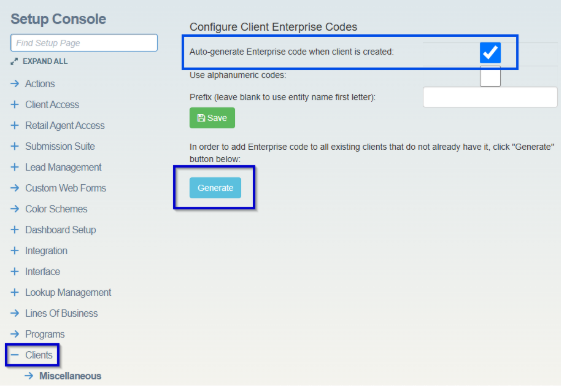
Click on Clients
-
Select the checkbox “Auto-generate Enterprise code when client is created” checkbox.
-
Click Generate to assign enterprise code to all existing clients.
BOOK OF BUSINESS REPORT
-
Navigate to Organization > Reports
-
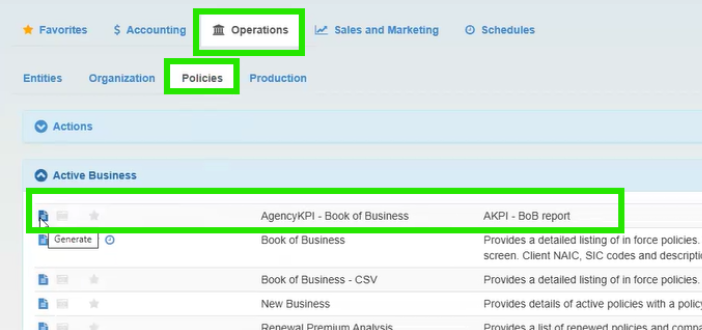
Click the Operations tab, then select the Policies Tab
-
Open the Active Business section
-
Click the Generate icon next to the AgencyKPI – Book of Business report
-
Click on Run Now. When the Excel file opens, choose a location on your computer to save.
PRODUCTION REPORT
-
Navigate to Organization > Reports
-
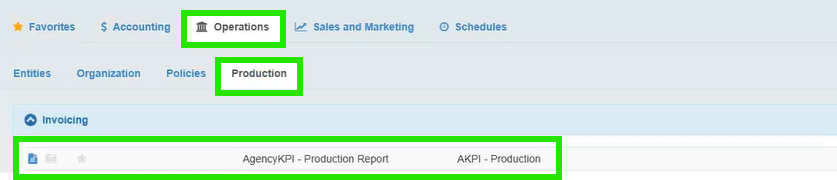
Click the Operations tab, then select the Production tab
-
Open the Invoicing Section
-
Click the Generate icon next to the AgencyKPI – Production Report
-
Click on Run Now. When the Excel files opens, choose a location on your computer to save.
Your reports are now ready to submit.
Email reports to [email protected].

